PPA Installing the latest KDE 4.8 in (K)Ubuntu 11.10:
http://kde.org/announcements/4.8/
Looks like a new version of KDE is out.
Showing posts with label Kubuntu. Show all posts
Showing posts with label Kubuntu. Show all posts
Friday, January 27, 2012

Sunday, August 14, 2011
Quad Monitors in Linux
Well, I couldn't get it to work in Unity yet. I do have a work around for my setup which works for Ubuntu GNOME classic and KDE. This is what I posted in the Ubuntu Forums so far.
Next steps: 1) see if I can get separate screen for each monitor and be able to move windows amongst them all and 2) get this to work in Unity!!
Ubuntu 11.04 + Gnome Classic + 4 LCD Monitors - http://ubuntuforums.org/showthread.php?t=1743715&page=2
July 7th, 2011:
Ugh, can't get 4 to work at all. I have NO problems with a dual setup. I want 1x4.
Running 8800GTS for ASUS 22" both DVI, Twinview works fine.
Other card is an 8400 GS, two Acer 19", one DVI, one VGA. I see everything fine in in nvidia x server settings, but the two Acer screens have a red tint to them when I enable them.
I've also had both Acer's working with the 8800. I wanted to add two more displays for multi-tasking so I got the ASUS screens and the 8400 (no particular reason except the ASUS's were cheap open box on newegg and the card was just something that seemed like it would work fine for what i wanted).
Running Ubuntu 11.04 Unity, I have also had the same issue in both KDE and XFCE desktops. Not sure if I've had dumb luck with duals and Ubuntu because I haven't had any issues, knock on wood.
Sorry, nothing to really add. Just wanted to log my setup and issue. Still a noob to Linux/Ubuntu (been using about a year), but I'm not looking back, I love it so far!!
Oh, and I am pretty sure I am not running any of the fancy Compiz stuff (3D, etc.). I don't want/need it.
Today/Yesterday: Sunday, August 14, 2011
Update: Still no working solution.
So I did get quad monitors to "work" but ran into the issues others have posted about (not sure if it was here or not). It was weird. I had live screens on all four monitors, but the far two "duals" on the right had the tool bar one the left of the two screens. So monitor 3 of 4 had the tool bar as if the screens had shifted from what I thought I had setup to be 1-4 starting from the far left. However, I had to click on the left two "duals" in blank space (I had a desktop background just no windows or the tool bar) which showed up on the right duals. So in order to restart or change the configurations back, I had to blindly click in monitor 1 of 4 to execute what I saw in monitor 3 of 4. Or it may have been the other way around. I forget, it has been probably a month since I did it. Sorry, should have posted when it was fresh, but I was so DAMN frustrated!! I want to say I enabled Xinerama to get the four monitors to "work" or at least display something on the screens with two TwinViews(???) since I have two monitors on one card each.
Anyways, still chugging along fine with dual monitors TwinView, except, I get black blocks every now and then on windows where I had to shrink or move the window to get everything to show again. I also noticed that Ubuntu Unity 11.04 allows the window snap feature of the half screen to work in the middle of the TwinView for both screens. I don't think that was working before, but maybe I missed it too. Thought that was pretty sweet. So if they are fixing stuff like that, then I think 11.10 and 12.04 are going to be so much better (well I am not sure if it was an Ubuntu update or nVidia or both since I did update my driver to 280.13, but I still think the next Ubuntu releases will be a big fix). Try to hang in there guys with Unity. I like it. At first I was ehh, but I got used to it. Of course everyone has their personal preferences for their needs, and I am definitely not going to "force" someone to use it or say that it is better than blah, blah, blah.
Anyways, hopefully next post will have a fix!
edit: Now that I think about, I remember I had the left two screens stretched as one screen at one point. Not sure if this was with the other two screens "working" or not. Maybe I'll try GNOME classic or KDE, but I relly like Unity now that I am used to it, .
edit2: ok, so a work around! GNOME classic and KDE allow quad monitors for my setup. However, I have "two" stretch "screens" for the left and right pair of monitors, but I can move windows to all four monitors. You have to have Xinerama enabled. Even if the pairs are treated like separate X screens then the monitors are still stretched. Also in the "separate" mode there is no bar across the right pair of screens nor can I move windows between pairs. This might be the best solution for now. At least I can use the real estate now. I can even use snap windows in KDE so I don't have to manually resize too much which I thought might be a problem with the stretched screens!! I am guessing XFCE might work in this way too. Sticking with KDE for now since a) I love blue, and b) I use Kile and Kopete anyways.
I'm new to KDE so I don't know all of its tricks. I am liking it so far.
Screenshots:
edit3: Ok, so KDE was running slow. Not sure if it had to do with the screens or not. Quads do work in XFCE and Xubuntu. I am going with Xubuntu for now.


Next steps: 1) see if I can get separate screen for each monitor and be able to move windows amongst them all and 2) get this to work in Unity!!
Thursday, July 21, 2011
Ubuntu Unity - some additional thoughts, some alternatives including Unity 2D and Lubuntu
Here are a couple of links to the Ubuntu forums on some discussion about Unity.
I am dating the articles so that myself and readers can see some chronology. Some of these posts on Unity were on some alpha/beta versions of 11.04 before the official release.
Post began May 1st, 2011 Improving Unity - http://ubuntuforums.org/showthread.php?t=1746352
Post began March 20th, 2011 Have you changed your mind about Unity? - http://ubuntuforums.org/showthread.php?t=1711109
Some info on the latest of the next Ubuntu release, Oneiric Ocelot Ubuntu 11.10.
Run Ocelot, Run! (Unity Report for 13 July) - http://www.omgubuntu.co.uk/?p=17599
Some more Unity story/article links.
Ahhh, the ultimate guide on Unity with a butt load of links posted by a Ubuntu Community Team, Canonical Ltd. developer, Jorge Castro. I've seen him on the Ask Ubuntu site too!
Apr 22, 2011 The Power User's Guide to Unity - http://www.linuxtoday.com/news_story.php3?ltsn=2011-04-22-011-41-NW-AP
This ^ links to here -> The Power User’s Guide to Unity -http://castrojo.tumblr.com/post/4795149014/the-power-users-guide-to-unity
May 10, 2011 How Ubuntu's Unity Can Be Improved - http://www.linuxtoday.com/infrastructure/2011051000439OSDVUB
This ^ links to here -> May 9, 2011 How Ubuntu's Unity Can Be Improved - http://itmanagement.earthweb.com/osrc/article.php/3932966/
May 18, 2011 Other Linux Distros' View of Ubuntu's Unity: It Ain't Pretty - http://www.linuxtoday.com/infrastructure/2011051800141OSDT
This ^ links to here -> May 17, 2011 Other Linux Distros' View of Ubuntu's Unity: It Ain't Pretty - http://itmanagement.earthweb.com/osrc/article.php/3933716/Other-Linux-Distros-View-of-Ubuntus-Unity-It-Aint-Pretty.htm
Apr 25, 2011 Ubuntu's Unity in 11.04 - Not All That Bad - http://www.linuxtoday.com/news_story.php3?ltsn=2011-04-25-007-41-OP-GN
This ^ links to here -> April 18, 2011 Ubuntu's Unity in 11.04 - Not All That Bad - http://all-things-linux.blogspot.com/2011/04/ubuntus-unity-in-1104-not-all-that-bad.html
May 20, 2011 Top 4 Lightweight, Official Ubuntu Based Alternatives for Ubuntu 11.04's Unity - http://www.linuxtoday.com/infrastructure/2011052000139OSHLUB
This ^ links to here -> May 18, 2011 Top 4 Lightweight, Official Ubuntu Based Alternatives for Ubuntu 11.04's Unity 3D - http://www.techdrivein.com/2011/05/top-4-lightweight-official-ubuntu-based.html
This ^ article also talks about Lubuntu and Unity 2D as well as Kubuntu and Xubuntu.
Lubuntu is Ubuntu running the LXDE or the lightweight version of the X11 Desktop Manager similar to how Kubuntu and Xubuntu run Ubuntu in alternate desktop managers, KDE and XFCE. Apparently, Lubuntu or the LXDE system is even lighter than the already light XFCE, that is it uses less resources such as memory and hdd space and/or other low-spec hardware. Lubuntu might also be a great alternative for tablet PCs and/or netbooks.
Links to information on Lubuntu and LXDE.


Lubuntu - https://wiki.ubuntu.com/Lubuntu
LXDE - https://wiki.ubuntu.com/LXDE
Install LXDE on Ubuntu 10.04 - http://www.youtube.com/watch?v=IbObK2_YQls
June 29, 2008 - LXDE - Lightweight X11 Desktop Environment for Ubuntu - http://www.ubuntugeek.com/lxde-lightweight-x11-desktop-environment-for-ubuntu.html
Lubuntu - https://launchpad.net/~lubuntu-desktop
LXDE - https://launchpad.net/~lxde
Lubuntu - http://lubuntu.net/
LXDE - http://lxde.org/
An article on using a GNOME like menu interface with Unity using Cardapio.
May 17, 2011 Get the Best of Both Worlds,Your Own Alternative to the Default Unity Main Menu - http://www.linuxtoday.com/infrastructure/2011051700739NWSWUB
This ^ links to here -> May 15, 2011 Get the Best of Both Worlds,Your Own Alternative to the Default Unity Main Menu - http://www.ubuntuvibes.com/2011/05/get-best-of-both-worldsyour-own.html
Ubuntu 11.04 : Uninstall Gnome3 and revert to Gnome 2.x - April 26, 2011 - http://www.ajopaul.com/2011/04/26/ubuntu-11-04-uninstall-gnome3-and-revert-to-gnome-2-x/
I am dating the articles so that myself and readers can see some chronology. Some of these posts on Unity were on some alpha/beta versions of 11.04 before the official release.
Post began May 1st, 2011 Improving Unity - http://ubuntuforums.org/showthread.php?t=1746352
Post began March 20th, 2011 Have you changed your mind about Unity? - http://ubuntuforums.org/showthread.php?t=1711109
Some info on the latest of the next Ubuntu release, Oneiric Ocelot Ubuntu 11.10.
Run Ocelot, Run! (Unity Report for 13 July) - http://www.omgubuntu.co.uk/?p=17599
Some more Unity story/article links.
Ahhh, the ultimate guide on Unity with a butt load of links posted by a Ubuntu Community Team, Canonical Ltd. developer, Jorge Castro. I've seen him on the Ask Ubuntu site too!
Apr 22, 2011 The Power User's Guide to Unity - http://www.linuxtoday.com/news_story.php3?ltsn=2011-04-22-011-41-NW-AP
This ^ links to here -> The Power User’s Guide to Unity -http://castrojo.tumblr.com/post/4795149014/the-power-users-guide-to-unity
May 10, 2011 How Ubuntu's Unity Can Be Improved - http://www.linuxtoday.com/infrastructure/2011051000439OSDVUB
This ^ links to here -> May 9, 2011 How Ubuntu's Unity Can Be Improved - http://itmanagement.earthweb.com/osrc/article.php/3932966/
May 18, 2011 Other Linux Distros' View of Ubuntu's Unity: It Ain't Pretty - http://www.linuxtoday.com/infrastructure/2011051800141OSDT
This ^ links to here -> May 17, 2011 Other Linux Distros' View of Ubuntu's Unity: It Ain't Pretty - http://itmanagement.earthweb.com/osrc/article.php/3933716/Other-Linux-Distros-View-of-Ubuntus-Unity-It-Aint-Pretty.htm
Apr 25, 2011 Ubuntu's Unity in 11.04 - Not All That Bad - http://www.linuxtoday.com/news_story.php3?ltsn=2011-04-25-007-41-OP-GN
This ^ links to here -> April 18, 2011 Ubuntu's Unity in 11.04 - Not All That Bad - http://all-things-linux.blogspot.com/2011/04/ubuntus-unity-in-1104-not-all-that-bad.html
May 20, 2011 Top 4 Lightweight, Official Ubuntu Based Alternatives for Ubuntu 11.04's Unity - http://www.linuxtoday.com/infrastructure/2011052000139OSHLUB
This ^ links to here -> May 18, 2011 Top 4 Lightweight, Official Ubuntu Based Alternatives for Ubuntu 11.04's Unity 3D - http://www.techdrivein.com/2011/05/top-4-lightweight-official-ubuntu-based.html
This ^ article also talks about Lubuntu and Unity 2D as well as Kubuntu and Xubuntu.
Lubuntu is Ubuntu running the LXDE or the lightweight version of the X11 Desktop Manager similar to how Kubuntu and Xubuntu run Ubuntu in alternate desktop managers, KDE and XFCE. Apparently, Lubuntu or the LXDE system is even lighter than the already light XFCE, that is it uses less resources such as memory and hdd space and/or other low-spec hardware. Lubuntu might also be a great alternative for tablet PCs and/or netbooks.
Links to information on Lubuntu and LXDE.


Lubuntu - https://wiki.ubuntu.com/Lubuntu
LXDE - https://wiki.ubuntu.com/LXDE
Install LXDE on Ubuntu 10.04 - http://www.youtube.com/watch?v=IbObK2_YQls
June 29, 2008 - LXDE - Lightweight X11 Desktop Environment for Ubuntu - http://www.ubuntugeek.com/lxde-lightweight-x11-desktop-environment-for-ubuntu.html
Lubuntu - https://launchpad.net/~lubuntu-desktop
LXDE - https://launchpad.net/~lxde
Lubuntu - http://lubuntu.net/
LXDE - http://lxde.org/
An article on using a GNOME like menu interface with Unity using Cardapio.
May 17, 2011 Get the Best of Both Worlds,Your Own Alternative to the Default Unity Main Menu - http://www.linuxtoday.com/infrastructure/2011051700739NWSWUB
This ^ links to here -> May 15, 2011 Get the Best of Both Worlds,Your Own Alternative to the Default Unity Main Menu - http://www.ubuntuvibes.com/2011/05/get-best-of-both-worldsyour-own.html
Edit: 8-22-11
Here is another article on Cardapio.
Use A Classic Menu In Unity (ClassicMenu Indicator Or Cardapio) - 04 Jun
2011 - http://www.webupd8.org/2011/06/use-classic-menu-in-unity-classicmenu.html
Some articles on using GNOME 2 in Ubuntu 11.04 also known as Ubuntu Classic.
How To Switch Back to the Old Gnome Interface in Ubuntu 11.04 - May 3, 2011 - http://techhamlet.com/2011/05/how-to-switch-back-to-the-old-gnome-interface-in-ubuntu-11-04/
Ubuntu 11.04 Change From Unity To Classic Gnome - March 5th, 2011 - http://scottlinux.com/2011/03/05/ubuntu-11-04-change-from-unity-to-classic-gnome/
Ubuntu 11.04 : Uninstall Gnome3 and revert to Gnome 2.x - April 26, 2011 - http://www.ajopaul.com/2011/04/26/ubuntu-11-04-uninstall-gnome3-and-revert-to-gnome-2-x/
Friday, July 1, 2011
Some info on gdm and kdm in Ubuntu
When installing KDE and/or XFCE (Kubuntu and Xubuntu in Ubuntu) you may have some questions about gdm and kdm. Here is a good forum link with some helpful information.
Changing default from kdm to gdm
Another link on Ubuntu/Kubuntu/Xubuntu and the GNOME and KDE display managers,
How to Switch from Ubuntu/Xubuntu to Kubuntu - http://www.spotht.com/2010/08/how-to-switch-from-ubuntuxubuntu-to.html
Changing default from kdm to gdm
Another link on Ubuntu/Kubuntu/Xubuntu and the GNOME and KDE display managers,
How to Switch from Ubuntu/Xubuntu to Kubuntu - http://www.spotht.com/2010/08/how-to-switch-from-ubuntuxubuntu-to.html
Edit: 8-22-11
Some more on GDM and KDM.
How To Switch Between GDM, LightDM Or KDM In Ubuntu [Quick Tip] - 28 Jul
2011 - http://www.webupd8.org/2011/07/how-to-switch-between-gdm-lightdm-or.html
Installing Kubuntu and Xubuntu (KDE and XFCE desktops) in Ubuntu
Just upgraded to Ubuntu 11.04 Natty Narwhal distro, and many changes have occurred. One, which I think I understand, is that Ubuntu has switched from the GNOME classic desktop to Ubuntu Unity desktop (which is still GNOME?). Apparently in the next release, the GNOME classic will not be available but GNOME version 3.0 will be the default (as Unity?). Anyways, the Unity desktop is a pretty big change from 10.10, and it has taken me a few days to get use to it. Some features I love, some are a little awkward, but like I said I am slowly getting use to it.
Basically the differences between Ubuntu, Kubuntu, and Xubuntu are the desktop interfaces and installation packages that come with each version. For example, Ubuntu uses the GNOME desktop, Kubuntu uses the KDE desktop, and Xubuntu uses the XFCE desktop which I just read is a more lightweight desktop than the others. Ubuntu now uses the Unity desktop, but you can still use GNOME if you don't like Unity. I am posting this because Unity has scared off some users so some people might want to check out other desktops. I personally like Unity and think it just takes some getting use to.
A link on how to install Kubuntu
How to install KDE on Ubuntu
The simple terminal command is:
and Xubuntu
Installing Xfce on Ubuntu
The simple terminal command is:
From the same website, http://www.psychocats.net, a post on going from Unity to GNOME
How to return to classic Gnome in Ubuntu
and a post on the difference between GNOME and KDE
KDE and Gnome Comparison
This site, http://www.psychocats.net/ubuntu, also has several other post concerning Ubuntu so you might want to check it out!
Some additional links from howtogeek - http://www.howtogeek.com/:
Install KDE (Kubuntu) on Ubuntu - http://www.howtogeek.com/howto/ubuntu/install-kde-kubuntu-on-ubuntu/
Install Xfce (Xubuntu) on Ubuntu Linux - http://www.howtogeek.com/howto/ubuntu/install-xfce-xubuntu-on-ubuntu-linux/
A good, but short, post on the different desktops in Ubuntu 11.04 from http://scottlinux.com/:
Ubuntu 11.04 Change From Unity To Classic Gnome - http://scottlinux.com/2011/03/05/ubuntu-11-04-change-from-unity-to-classic-gnome/

http://www.xubuntu.org/


http://www.xfce.org/
http://www.kubuntu.org/

http://www.kde.org/

Plasma Desktop


http://www.gnome.org/

GNOME Ubuntu Classic

Basically the differences between Ubuntu, Kubuntu, and Xubuntu are the desktop interfaces and installation packages that come with each version. For example, Ubuntu uses the GNOME desktop, Kubuntu uses the KDE desktop, and Xubuntu uses the XFCE desktop which I just read is a more lightweight desktop than the others. Ubuntu now uses the Unity desktop, but you can still use GNOME if you don't like Unity. I am posting this because Unity has scared off some users so some people might want to check out other desktops. I personally like Unity and think it just takes some getting use to.
A link on how to install Kubuntu
How to install KDE on Ubuntu
The simple terminal command is:
sudo apt-get install kubuntu-desktop
and Xubuntu
Installing Xfce on Ubuntu
The simple terminal command is:
sudo apt-get install xubuntu-desktop
From the same website, http://www.psychocats.net, a post on going from Unity to GNOME
How to return to classic Gnome in Ubuntu
and a post on the difference between GNOME and KDE
KDE and Gnome Comparison
This site, http://www.psychocats.net/ubuntu, also has several other post concerning Ubuntu so you might want to check it out!
Some additional links from howtogeek - http://www.howtogeek.com/:
Install KDE (Kubuntu) on Ubuntu - http://www.howtogeek.com/howto/ubuntu/install-kde-kubuntu-on-ubuntu/
Install Xfce (Xubuntu) on Ubuntu Linux - http://www.howtogeek.com/howto/ubuntu/install-xfce-xubuntu-on-ubuntu-linux/
A good, but short, post on the different desktops in Ubuntu 11.04 from http://scottlinux.com/:
Ubuntu 11.04 Change From Unity To Classic Gnome - http://scottlinux.com/2011/03/05/ubuntu-11-04-change-from-unity-to-classic-gnome/

http://www.xubuntu.org/
Xubuntu is a community developed operating system that is well-suited for laptops and desktops. Whether you use it at home, at school or at work Xubuntu contains all the applications you'll ever need, from word processing and email applications, to web server software and programming tools.
Xubuntu is and always will be free of charge. You do not pay any licensing fees. You can download, use and share Xubuntu with your friends, family, school or business for absolutely nothing.
We issue a new Xubuntu release every six months. That means you'll always have the latest and greatest applications that the open source world has to offer.
Xubuntu is designed with security in mind. You get free security updates for at least 18 months and with the Long Term Support (LTS) version you get three years support. There is no extra fee for the LTS version, we make our very best work available to everyone on the same free terms. Upgrades to new versions of Xubuntu are and always will be free of charge.
Everything you need comes on one CD, providing a complete working environment. Additional software is available online.
The graphical installer enables you to get up and running quickly and easily. A standard installation should take less than 25 minutes.
Once installed your system is immediately ready-to-use. We provide you with a desktop offering that includes a full set of productivity, internet, drawing and graphics applications, and games.



http://www.xfce.org/

http://www.kubuntu.org/
Kubuntu is a community developed and supported project. Since its launch in October 2004, Kubuntu has become one of the most highly regarded Linux distributions with millions of users around the world.
Kubuntu will always be free to download, free to use and free to distribute to others. With these goals in mind, Kubuntu aims to be the most widely used Linux system, and is the centre of a global open source software ecosystem.
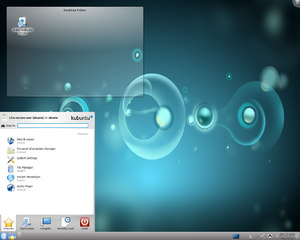
http://www.kde.org/

Plasma Desktop


http://www.gnome.org/

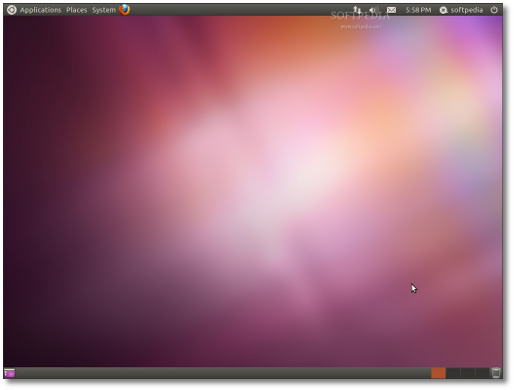
GNOME Ubuntu Classic
Subscribe to:
Posts (Atom)