Showing posts with label PDF. Show all posts

Wednesday, September 4, 2013

Why doesn't Chromium have “Chrome PDF Viewer” plugin?

This is a nice way to get the PDF viewer to work in Chromium.  Essentially, you take the "command" from Chrome and link it, or copy it, to Chromium.

sudo ln -s /opt/google/chrome/libpdf.so /usr/lib/chromium-browser/

http://askubuntu.com/questions/12584/why-doesnt-chromium-have-chrome-pdf-viewer-plugin

http://askubuntu.com/questions/220913/pdf-viewer-in-chromium

Tuesday, June 5, 2012

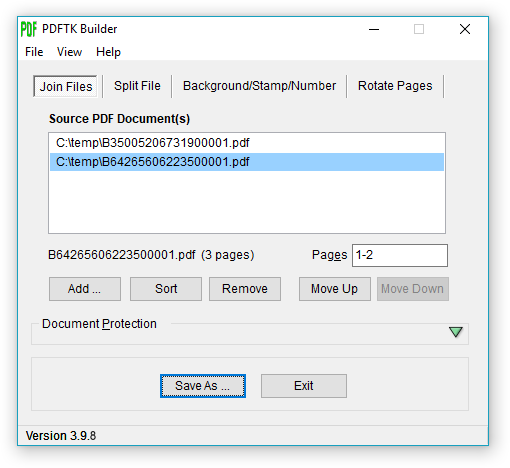
PDF editor, free, for Windows for rotating PDFs - PDFTK Builder

PDFTK Builder is a nice free software with a good GUI in case you need to do minor changes to a PDF file such as rotating a PDF scan (my case).

Edit: This is also great for splitting and merging pdfs!

http://angusj.com/pdftkb/#pdftkbuilder

Full installation (includes PDFTK ver 1.41): 2 MB
http://angusj.com/pdftkb/pdftkb_setup.exe


Thursday, March 17, 2011

Quickie - PDFs - middle mouse button

Here's a quickie. Most may already know this, but I didn't so surely someone else doesn't, :P. When using a PDF reader (at least for Okular and Foxit) you can click the middle mouse button on the scroll bar and it will take you to that area of the PDF.

edit: This also works for any window in Ubuntu (and maybe for Windows too?). I feel lame that I didn't already know this, :P.

Sunday, December 19, 2010

One Advantage of Ubuntu over Windows: File Naming

A quick observation here.  One thing I have noticed between Ubuntu and Windows is that when naming files, I haven't (in Ubuntu) run into any problems with file length.  I think the Ubuntu file name system even takes some symbols like the colon (:).  Also, another small but helpful and cool thing (to me at least) is that when renaming a file, I can leave the PDF open in Foxit and rename it without any issues unlike in Windows with Adobe (it may be just an Adobe thing, I haven't checked).  However, if you are sharing files with a Windows user, the Windows system can't/won't copy the files.

Thursday, August 19, 2010

More on PDFs

PDFs
So I wanted to clarify something before adding some stuff to the PDF post. Apparantly, Adobe did develop the PDF or Portable Document Format according to Wikipedia, Portable Document Format wiki link (I know, I know a very reliable source, but it seems to give decent quick information). I guess this is the reason why the readers are free and other tools for editing are pay only.

Ah, see this excerpt from the Wikipedia post, "Anyone may create applications that can read and write PDF files without having to pay royalties to Adobe Systems; Adobe holds patents to PDF, but licenses them for royalty-free use in developing software complying with its PDF specification.[10]"

Nitro PDF Reader
Anyways, I wanted to update on the PDF post. I found another free PDF reader which gives you another choice rather than Adobe Reader or Foxit Reader. This reader is by Nitro PDF Software and can be dowloaded here: Nitro PDF Software Reader.  Here are a few screen shots.


Foxit PDF Reader
Specs for the Foxit Reader 4.0 can be seen here: Feature and Benefits. As I said before, it seems that you can comment, add textboxes, add arrows, highlight, etc. in Foxit Reader but with an watermark. However, the Features & Benefits section of their website don't seem to mention it, as in it is free without the watermark.

A pro for Foxit Reader is that is doesn't seem to be as resource intensive as Adobe Reader (same for Nitro). However, a con is that Foxit Reader is only available for Windows which is a no-no for us non-Windows users (more that later, I am transitioning from Windows 7 to Ubuntu!).

Here is a link to a comparison sheet for Foxit's software packages. Here are some screenshot images from Foxit's site.  I will share some of mine with the comments and whatnot when I get back to Windows.

images/screenshots/maininterface.pngimages/screenshots/readercomment.jpgimages/screenshots/readertool.jpgimages/screenshots/readeredit.jpgimages/screenshots/readerhelp.jpgimages/screenshots/readerview.jpgimages/screenshots/readerfile.jpg


All in all I think Foxit Reader is a GREAT alternative for viewing PDFs with slight editing features for Windows users, and I would recommend using it over Adobe for its lower resource usage and the fact that it gives you some freedom from having to use mainstream software.

Ok, I take back that Foxit doesn't work on Linux. It does, I forgot I just installed it on my Ubuntu partition. The version is low, 1.1, so I think they just released it. Anyways, points for Foxit, hooray! Ah, it's Nitro that doesn't have a Linux version yet, :/.

Big minus for Foxit on Linux that I just found out. Unfortunately, the Linux version just did come out, and they don't have the editing tools that are available on the web version. Booo, I must find something else!


Nitro PDF Reader (more)
Nitro PDF Reader, IMO, looks better aesthetically than Foxit, but like I said there is no software basis reason, just a personal eye catching choice. However, it does not support a version for Linux yet. Although, you can use it in Firefox as a plugin (addin whatever) to view PDF's outside the browser using your pdf reader/viewer of choice or in the browser by PDF Download created by Nitro PDF Software (this is their website www.pdfdownload.org) on a Linux OS. I know weird, I don't totally understand it, but it works.

Screenshot of Firefox and Nitro in action together:
Friday, July 16, 2010

PDF World

Well, as I delve deeper into my early research career, I have noticed my fondness of using open source software more frequently. I have already posted about Ubuntu and Wubi and about the frustrations of using Word with EndNote or Mathtype. Mendeley Desktop seems to be the best citation/source organization software which you can upgrade for more space and shared collections starting at $4.99 a month. I plan to explore Latex here in the next few weeks and want/plan on using it for my PhD thesis. Latex seems to be the best documentation software for large documents with lots of equations/graphics/etc. Also, you have the freedom to pretty much do whatever you want, especially with the layout. You are not restricted to certain rules that Word employs.

So this post is about the familiar and useful document form called PDF. When I hear PDF I automatically think Adobe Acrobat. Adobe is probably the leader in PDF software, but they do not own the PDF name. There are plenty of free readers out there including Adobe's Reader and the one I am currently using Foxit. Both of these software allow you to do basic stuff such as opening a PDF file and some editing. I know Foxit will allow highlighting, comments, notes, arrows, etc. with their free version. Of course when you use these features Foxit places a watermark on the page which is no big deal for me since I am using these features for personal research purposes obly. I don't need to print them out, and the watermark does not affect any major function. This is great news for those of us who only need PDF software for simple things as these.

If you need more features I would consider buying the software which there are plenty of choices and the price isn't too bad (from around $20 to $100 or more). I would also look into your school to see if they have licensed versions and/or discounts for students and faculty. There are usually student versions available at a large discount which contain most needed features too.

Anyways, we sometimes need a few more features such as deleting pages, rotating certain pages, combined PDFs into one document, rearranging pages, splitting a PDF into several separate PDFs, creating PDFs, etc. I have googled and searched thinking to myself that surely there is some free software that someone has kindly taken their time to develop that would do these things. (Down with tha man!!) Because unfortunately Foxit only rotates every page in the document, and you cannot save it at its rotated position. I am not sure about Adobe Reader or any other free reader.

Upon browsing the www, I did stumble across a somewhatofa PDF edior. (Here is one of the forum discussions where I found some ideas


(oh, and sont click on the docq link, it seemed kinda fishy)

This software is called PDFTK Builder, and it is absolutely free. Another bonus is that this software has a GUI for us programming challeged people because there is the orginal PDF toolkit builder that is programming based)!!

This PDF toolkit is great. It allows you to combine PDFs, rotate pages, and much more. I will update as I figure out more. I just combined two PDFs with ease!

So my point here is not to convert everyone to open source software but to be open minded and available to many platforms. It is great to know the most common software such as Adobe, Microsoft Office, Windows, etc, but it would be well worth investing time into to some other versions such as Mac OS, Linux, Latex, etc. Imagine a future employer or collaborator asking if you know how to use such and such software in an interview or meeting and/or being able to put a multitude of knowing various software. This, IMO, is a great self promoting/marketing tool. Also, it would be nice if a collaborator began a research project in a certain program suite which you could pick up easily or would already be somewhat familiar or even an expert in so as to avoid much repetition or frustration. However, all of this is not necessary just a suggestion and my experience because one could quite possibly run into a pitfall of trying to learn too much and spreading oneself too thin. Just take your time and experiment with all sorts of programs.

As for future post, I plan to cover some more in Mendeley now that I have been using it for a few weeks. I also plan to cover LinkedIn, a professional "facebook" type networking tool. A few other things that I would like to cover are my experience with Latex and an Ubuntu update. as well as OpenOffice, Google Documents, and drawing programs such as Google SketchUp.