Install Spotify Client in Ubuntu 11.10 (Oneiric Ocelot) | Liberian Geek
SWEET!!
Archival purposes:
Terminal:
sudo apt-key adv --keyserver keyserver.ubuntu.com --recv-keys 4E9CFF4E
sudo gedit /etc/apt/sources.list.d/spotify.list
Write to text file and then save:
deb http://repository.spotify.com stable non-free
Again in the terminal:
sudo apt-get update
sudo apt-get install spotify-client-qt
Monday, April 23, 2012

Sunday, April 22, 2012
Xlib: extension "RANDR" missing on display ":0" error
So I was trying to run a simple code for a contour plot using the Spyder Python IDE and this error popped up:
Xlib: extension "RANDR" missing on display ":0"
Through Google, I found that the solution was to install this package from the USC:
gtk2-engines-pixbuf
I ran the code again, the error message was gone, and it generated my plot.
Found solution here:
http://askubuntu.com/questions/66356/gdk-gtk-warnings-and-errors-from-the-command-line
http://yoodey.com/solving-gtk-warning-unable-locate-theme-engine-modulepath-pixmap
Xlib: extension "RANDR" missing on display ":0"
Through Google, I found that the solution was to install this package from the USC:
gtk2-engines-pixbuf
I ran the code again, the error message was gone, and it generated my plot.
Found solution here:
http://askubuntu.com/questions/66356/gdk-gtk-warnings-and-errors-from-the-command-line
http://yoodey.com/solving-gtk-warning-unable-locate-theme-engine-modulepath-pixmap
Saturday, April 21, 2012


Friday, April 20, 2012
Removing page number from title page - LaTeX - Formatting
Simply use the command \thispagestyle{empty} after the /\maketitle command.
http://www.latex-community.org/forum/viewtopic.php?f=5&t=225
http://tex.stackexchange.com/questions/1736/removing-page-number-for-title-page
http://www.latex-community.org/forum/viewtopic.php?f=5&t=225
http://tex.stackexchange.com/questions/1736/removing-page-number-for-title-page
Thursday, April 19, 2012
Update on the xfrac LaTeX package (\sfrac command) - TeX Live - Ubuntu 11.10
I was trying to compile my LaTeX document and thought I had all the packages I needed for TeX Live because I was working on a fairly new computer on which I had just installed Ubuntu 11.10 and relevant goodies. I had the xfrac package initialized in the preamble and was using the /sfrac command for a better looking slanted fraction. I was getting an error:
"xfrac.sty not found"
and was quite confused because I thought I had all the dependencies installed. The old dependency was texlive-math-extra, but it has now been moved to texlive-latex3. I scrolled through the USC and sure enough I had missed this package install. Installed it, and BAM! It works!!
"xfrac.sty not found"
and was quite confused because I thought I had all the dependencies installed. The old dependency was texlive-math-extra, but it has now been moved to texlive-latex3. I scrolled through the USC and sure enough I had missed this package install. Installed it, and BAM! It works!!
Wednesday, April 18, 2012
Python - 2d plot - matplotlib
Woohoo! I did my first plot in Python!! I am trying out Python because it seems to offer many utilities I can use in one place for various scientific research capabilities. In Ubuntu 11.10 I have installed the Spyder IDE and a few libraries such as scipy, numpy, matplotlib, and mayavi. Eventually, I want to plot 3-D streamlines which is where mayavi comes into to play, thus I need to learn Python. Plus, Sage can also use Python which I plan to experiment with later.
I am still very green to Python although I do have some programming experience (mainly MATLAB and a C class I took about 9 years ago, :P!!). For example, I've seen a few ways how to load these libraries:
or
From here I found this nice quote: http://old.nabble.com/pylab-td24910613.html
http://johnstachurski.net/lectures/more_numpy.html
Another explanation I found: http://code.activestate.com/lists/python-tutor/87392/
Anyways, I would recommend reading on the structure of python here http://docs.python.org/contents.html which is what I plan on doing.
On to the plot.
The code:
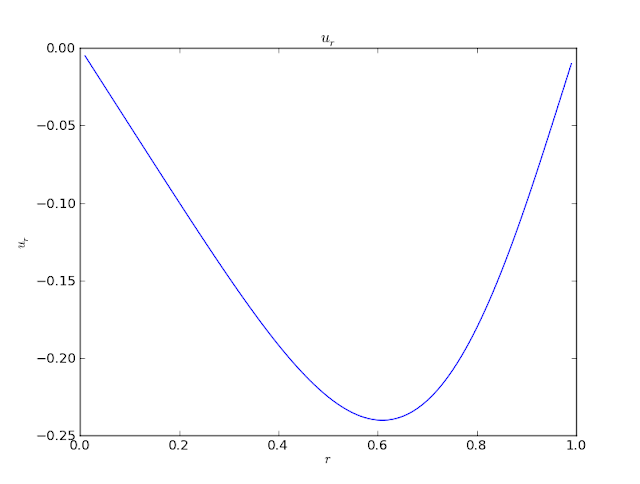
The figure:
Screenshot of Spyder IDE:

I am still very green to Python although I do have some programming experience (mainly MATLAB and a C class I took about 9 years ago, :P!!). For example, I've seen a few ways how to load these libraries:
import numpy
import pylab
or
from pylab import *
From here I found this nice quote: http://old.nabble.com/pylab-td24910613.html
Numpy is the common core, providing N-dimensional arrays and math; matplotlib is a plotting library, using numpy; scipy is a collection of math/science functionality, also using numpy.Here is a decent (decent as in I still don't understand fully) explanation of the different import/package/library options:
http://johnstachurski.net/lectures/more_numpy.html
A quick aside on the relationship between Pylab and Matplotlib
One way to do plots with Matplotlib is like this
import pylab
pylab.plot([1, 2, 3])
pylab.show()
The same can be achieved by
import matplotlib.pyplot as plt
plt.plot([1, 2, 3])
plt.show()
What is the difference?
We can see the difference in the pylab initialization file:
## some stuff
from numpy import *
from numpy.fft import *
from numpy.random import *
from numpy.linalg import *
## some more stuff
from matplotlib.pyplot import *
## some more stuff
Thus,
import pylab brings in- everything from the NumPy namespace
- everything from various NumPy submodules (
random,linalg, etc.) - everything from
matplotlib.pyplot
The plotting functions are in
matplotlib.pyplotAnother explanation I found: http://code.activestate.com/lists/python-tutor/87392/
what is the basic difference between the commands
import pylab as *
import matplotlib.pyplot as plt
import numpy as np import numpy as *One response: http://code.activestate.com/lists/python-tutor/87394/
import pylab as * pollutes your global namespace with all kinds of symbols. If you don't know them all, you might accidentally use one of them in your own code, and wonder why things aren't working the way you expected. Better is import pylab and then use pylab.something to access a symbol from pylab Some prefer import pylab as pab (or something) and then use pab.something to save some typing. import matplotlib.pyplot as plt looks in the matplotlib *package" for the module pyplot, then imports it with a shortcut name of pltAnother response: http://code.activestate.com/lists/python-tutor/87400/
> what is the basic difference between the commands > import pylab as * Are you sure you don't mean from pylab import * ??? The other form won't work because * is not a valid name in Python. You should ghet a syntax error. > import matplotlib.pyplot as plt This is just an abbreviation to save typing matplotlib.pyplot in front of every reference to the module names. > import numpy as np as above > import numpy as * again an error.
Anyways, I would recommend reading on the structure of python here http://docs.python.org/contents.html which is what I plan on doing.
On to the plot.
The code:
from pylab import *

r=arange(0,1,0.01)

z=arange(0,1,0.01)

sigma=1

l=1

kappa=1/(2*pi*sigma*l)

u=-(kappa/r)*sin(pi*pow(r, 2))

plot(r,u)

ylabel('$ u_r $')

xlabel('$ r $')

title('$ u_r $')

show()
The figure:

Screenshot of Spyder IDE:

History of Ubuntu: Revisited & Updated | Tech Drive-in
History of Ubuntu: Revisited & Updated | Tech Drive-in
Amen brother!! Ubuntu has done the exact same for me as you state in your opening. I began with 8.04 but did not really get into it until I became fed up with Windows and non-free software. I wanted an alternative and since 10.04 I haven't looked back!!!!
Amen brother!! Ubuntu has done the exact same for me as you state in your opening. I began with 8.04 but did not really get into it until I became fed up with Windows and non-free software. I wanted an alternative and since 10.04 I haven't looked back!!!!
Monday, April 16, 2012
Contour plotting (2D) - Sage - Streamlines
So, I am getting more familiar with other scientific software to use for my research. One I've been trying is Sage, and I've made a few post about it. I like it so far. Here is an example of a contour plot I've done recently for some streamlines and some effects.
http://www.sagemath.org/doc/reference/sage/plot/contour_plot.html


http://www.sagemath.org/doc/reference/sage/plot/contour_plot.html
kap_pa = 0.00621
r,z = var('r,z')
psee1 = kap_pa*z*sin(pi*r^2)
contour_plot(psee1, (r, 0, 1), (z, 0, 1), contours = 20, fill=False, axes_labels=['r','z'], aspect_ratio=1)

kap_pa = 0.00621
r,z = var('r,z')
psee1 = kap_pa*z*sin(pi*r^2)
contour_plot(psee1, (r, 0, 1), (z, 0, 2), contours = 20, fill=False, axes_labels=['r','z'], aspect_ratio=2)

kap_pa = 0.00621
r,z = var('r,z')
psee1 = kap_pa*z*sin(pi*r^2)
contour_plot(psee1, (r, 0, 1), (z, 0, 1), contours = 20, fill=True, axes_labels=['r','z'])

kap_pa = 0.00621
r,z = var('r,z')
psee1 = kap_pa*z*sin(pi*r^2)
contour_plot(psee1, (r, 0, 1), (z, 0, 2), contours = 20, fill=True, axes_labels=['r','z'], aspect_ratio=2)

kap_pa = 0.00311
r,z = var('r,z')
psee1 = kap_pa*z*sin(pi*r^2)
contour_plot(psee1, (r, 0, 1), (z, 0, 2), contours = 20, fill=True, axes_labels=['r','z'], aspect_ratio=2)

kap_pa = 0.00311
r,z = var('r,z')
psee1 = kap_pa*z*sin(pi*r^2)
contour_plot(psee1, (r, 0, 1), (z, 0, 1), contours = 20, fill=False, linestyles='dashdot', axes_labels=['r','z'])

kap_pa = 0.00621
r,z = var('r,z')
psee1 = kap_pa*z*sin(pi*r^2)
contour_plot(psee1, (r, 0, 1), (z, 0, 1), contours = 20, fill=False, linewidths=[1,5], linestyles=['solid','dashed'], axes_labels=['r','z'])

kap_pa = 0.00621
r,z = var('r,z')
psee1 = kap_pa*z*sin(pi*r^2)
contour_plot(psee1, (r, 0, 1), (z, 0, 1), contours = 20, cmap='hsv', axes_labels=['r','z'])

kap_pa = 0.00621
r,z = var('r,z')
psee1 = kap_pa*z*sin(pi*r^2)
contour_plot(psee1, (r, 0, 1), (z, 0, 1), contours = 20, cmap=[(1,0,0), (0,1,0), (0,0,1)], axes_labels=['r','z'])

kap_pa = 0.00621
r,z = var('r,z')
psee1 = kap_pa*z*sin(pi*r^2)
contour_plot(psee1, (r, 0, 1), (z, 0, 1), contours = 20, cmap='hsv', labels=True, axes_labels=['r','z'])

kap_pa = 0.00621
r,z = var('r,z')
psee1 = kap_pa*z*sin(pi*r^2)
contour_plot(psee1, (r, 0, 1), (z, 0, 1), contours = 20, cmap='hsv', labels=True, label_fmt="%1.4f", label_colors='black', axes_labels=['r','z'])

kap_pa = 0.00621
r,z = var('r,z')
psee1 = kap_pa*z*sin(pi*r^2)
contour_plot(psee1, (r, 0, 1), (z, 0, 1), contours = 20, cmap='hsv', labels=True, label_fmt="%1.4f", label_colors='black', label_fontsize=14, axes_labels=['r','z'])

kap_pa = 0.00621
r,z = var('r,z')
psee1 = kap_pa*z*sin(pi*r^2)
contour_plot(psee1, (r, 0, 1), (z, 0, 1), contours = 20, cmap='hsv', colorbar=True, labels=True, label_fmt="%1.4f", label_colors='black', label_fontsize=10, axes_labels=['r','z'])

Friday, April 13, 2012


Monday, April 9, 2012
Ubuntu 12.04 Beta 2 Released, Changes and Screenshots ~ Ubuntu Vibes | Daily Ubuntu Linux Updates
Ubuntu 12.04 Beta 2 Released, Changes and Screenshots ~ Ubuntu Vibes | Daily Ubuntu Linux Updates
Meant to post this awhile back, but I've been busy. The official release of 12.04 is almost here anyways. April 29th!
Meant to post this awhile back, but I've been busy. The official release of 12.04 is almost here anyways. April 29th!
Adobe flash plugin not working on any web browser - Ubuntu 11.10 - fixed
Guess what? Flash sucks, especially with Ubuntu, but until HTML5 takes over we are stuck with flash. For some unknown reason flash began NOT to WORK at ALL on my Ubuntu 11.10 machines (plural!). I tried everything! Finally, I got one machine to work by installing the sevenmachines PPA or so I thought. Apparently the sevenmachines PPA just went obsolete.
Anyways, my final fix:
1. Saw (in USC of all places!) where Gnash is supposedly conflicting with the flashplugin-installer, so I removed it.
2. I then typed flashplugin-installer into the USC and installed or made sure it was installed.
Not sure if this is the actual fix or if I got a combination by luck. I also have NO idea why this works or why the flash began to mess up in the first place. I think it may have begun with an Ubuntu update. Anyways, good luck, hope this helps someone.
Anyways, my final fix:
1. Saw (in USC of all places!) where Gnash is supposedly conflicting with the flashplugin-installer, so I removed it.
2. I then typed flashplugin-installer into the USC and installed or made sure it was installed.
Not sure if this is the actual fix or if I got a combination by luck. I also have NO idea why this works or why the flash began to mess up in the first place. I think it may have begun with an Ubuntu update. Anyways, good luck, hope this helps someone.
Wednesday, March 28, 2012
Cradle Song, New Visual Novel/Game for Linux ~ Ubuntu Vibes | Daily Ubuntu Linux Updates
Cradle Song, New Visual Novel/Game for Linux ~ Ubuntu Vibes | Daily Ubuntu Linux Updates
This sounds pretty cool too, and they say Linux is dead...
This sounds pretty cool too, and they say Linux is dead...
Friday, March 23, 2012
Enabling the CTRL+ATL+BACKSPACE key sequence in Ubuntu 11.10 for X Screen kill
System settings -> Keyboard -> Layout Options -> Options


Chromium daliy builds PPA
In order to add the Chromium daily builds PPA to your Ubuntu repositories use the terminal and type the command:
sudo apt-add-repository ppa:chromium-daily/ppa
Ubuntu 11.10 - GNOME classic install
To install the classic GNOME interface use in the terminal the command:
Found here:
http://www.liberiangeek.net/2011/08/return-to-ubuntu-classic-desktop-in-ubuntu-11-10/
http://www.webupd8.org/2011/08/installing-using-classic-gnome-desktop.html
http://ubuntugenius.wordpress.com/2011/10/23/ubuntu-11-10-fix-how-to-add-the-classic-desktop-and-gnome-3-shell-as-login-options/
However this site uses:
I guess both would work. I used the first
http://tombuntu.com/index.php/2011/09/11/install-the-classic-desktop-in-ubuntu-11-10/
sudo apt-get install gnome-session-fallback
Found here:
http://www.liberiangeek.net/2011/08/return-to-ubuntu-classic-desktop-in-ubuntu-11-10/
http://www.webupd8.org/2011/08/installing-using-classic-gnome-desktop.html
http://ubuntugenius.wordpress.com/2011/10/23/ubuntu-11-10-fix-how-to-add-the-classic-desktop-and-gnome-3-shell-as-login-options/
However this site uses:
sudo apt-get install gnome-panel
I guess both would work. I used the first
http://tombuntu.com/index.php/2011/09/11/install-the-classic-desktop-in-ubuntu-11-10/
LaTeX - Beamer - Adding a logo to your slides
In order to add a logo to your LaTeX Beamer slides (I think default is bottom right) use the command:
in your preamble. Screenshot:

Found here:
http://tex.stackexchange.com/questions/18410/how-can-i-add-more-than-one-logo-to-my-beamer-presentation
http://tex.stackexchange.com/questions/27906/positioning-logo-in-the-front-page-as-well-as-slides
(comments section of this site) http://www.shawnlankton.com/2008/02/beamer-and-latex-with-keynote-theme/
To make the logo appear on title slide only try:
http://groups.google.com/group/beamer-class/browse_thread/thread/9dbc2552a398ade2?pli=1
Also see:
http://texblog.org/2011/01/27/add-your-logo-to-the-title-page/
\logo{\includegraphics[height=1cm]{UTSI_logo.png}}
in your preamble. Screenshot:

Found here:
http://tex.stackexchange.com/questions/18410/how-can-i-add-more-than-one-logo-to-my-beamer-presentation
http://tex.stackexchange.com/questions/27906/positioning-logo-in-the-front-page-as-well-as-slides
(comments section of this site) http://www.shawnlankton.com/2008/02/beamer-and-latex-with-keynote-theme/
To make the logo appear on title slide only try:
http://groups.google.com/group/beamer-class/browse_thread/thread/9dbc2552a398ade2?pli=1
Also see:
http://texblog.org/2011/01/27/add-your-logo-to-the-title-page/
Monday, March 19, 2012
Physics Buzz: New Gecko Insights Inspire Even Stronger Adhesives
Physics Buzz: New Gecko Insights Inspire Even Stronger Adhesives
Bio-inspired engineering. Hypersonics, are you getting it?
Bio-inspired engineering. Hypersonics, are you getting it?
Friday, March 16, 2012
Beamer class (presentation mode) in LaTeX - an example of subfloats
I'd thought I'd post an example of a subfloat (a subfigure, but subfig is the package and subfloat the command; the subfigure package and command are older, see http://www.faqoverflow.com/tex/1966.html and http://texblog.org/tag/subfigure/) in Beamer, a presentation class for LaTeX.

These are some concept hypersonic vehicles. I just used this as an ending slide for my MS defense presentation.
Clockwise beginning at top-right:
Sentinel:
Quicksat:
Stargazer:
\begin{frame}

  \begin{figure}[t]
   \centering
   \captionsetup[subfloat]{labelformat=empty}
   \subfloat[]{\label{} \includegraphics[scale = 0.15]{Sentinel_Bradford_et_al_07.png}}
   \subfloat[]{\label{} \includegraphics[scale = 0.15]{Hyperion_(3)_Olds_et_al_99.png}}\\
   \subfloat[]{\label{} \includegraphics[scale = 0.15]{Stargazer_Olds_et_al_99.png}}
   \subfloat[]{\label{} \includegraphics[scale = 0.15]{Quicksat_(2)_Bradford_et_al_04.png}}
%    \captionsetup{labelsep=period, labelfont=sc} %\caption{} \label{fig:}
  \end{figure}

\end{frame}
Screenshot:

These are some concept hypersonic vehicles. I just used this as an ending slide for my MS defense presentation.
Clockwise beginning at top-right:
Sentinel:
Bradford, J. E., Olds, J. R., & Wallace, J. G. (2007). Concept Assessment of a Hydrocarbon Fueled RBCC-Powered Military Spaceplane. 54th Joint Army-NavyNASA-Air Force (JANNAF) Propulsion Meeting (JPM) and 5th Modeling and Simulation / 3rd Liquid Propulsion / 2nd Spacecraft Propulsion Joint Subcommittee Meeting. Denver, Colorado.
Hyperion:
Olds, J. R., Bradford, J. E., Charania, A. C., Ledsinger, L., McCormick, D. J., & Sorensen, K. L. (1999). Hyperion: An SSTO Vision Vehicle Concept Utilizing Rocket-Based Combined Cycle Propulsion. 9th International Space Planes and Hypersonic Systems and Technologies Conference and 3rd Weakly Ionized Gases Workshop. Norfolk, VA.
Quicksat:
Bradford, J. E., Charania, A., Wallace, J., & Eklund, D. R. (2004). Quicksat: A Two-Stage to Orbit Reusable Launch Vehicle Utilizing Air-Breathing Propulsion for Responsive Space Access. Space 2004 Conference and Exhibit. San Diego, California.
Stargazer:
Olds, J. R., Ledsinger, L., Bradford, J. E., Charania, A., McCormick, D., & Komar, D. R. (1999). Stargazer: A TSTO Bantam-X Vehicle Concept Utilizing Rocket-Based Combined Cycle Propulsion. 9th International Space Planes and Hypersonic Systems and Technologies Conference and 3rd Weakly Ionized Gases Workshop. Norfolk, VA.
LaTeX - formatting - utilizing vertical space - \vspace
Again, I was adjusting the look of my CV using the \vspace command because there were extra spaces between section headings, an horizontal line, and the first entry of the section like so:

Here is that section of code:
So I tightened it like this:

So little things like this make LaTeX, IMO, very versatile/customizable and small changes can make big differences in looks.

Here is that section of code:
\section*{Employment}
\HRule
\begin{itemize}
\item \textbf{Graduate Research Assistant}
\item University of Tennessee Space Institute, Tullahoma, TN
\item November 2011 - Present
 \begin{itemize}
 \item AFRL Prime Contract No. FA9300-06-C-0023
 \item Assisted major advisor who was a reviewer for journal papers in critiquing and writing summaries
 \item Assisted major advisor in building and proofreading research grant proposals
 \end{itemize}
\end{itemize}
\HRule
\begin{itemize}
\item \textbf{Graduate Research Assistant}
\item University of Tennessee Space Institute, Tullahoma, TN
\item August 2006 - May 2011
 \begin{itemize}
 \item Worked on AFOSR grant No. FA9101-06-D-0001/0003, Advanced High-Speed Propulsion Development; Out of the grant I produced and presented one AIAA conference paper and my MS thesis in Aerospace Engineering
So I tightened it like this:

\section*{Employment} \vspace{-5 mm}
\HRule \vspace{-6 mm}
\begin{itemize}
\item \textbf{Graduate Research Assistant}
\item University of Tennessee Space Institute, Tullahoma, TN
\item November 2011 - Present
 \begin{itemize}
 \item AFRL Prime Contract No. FA9300-06-C-0023
 \item Assisted major advisor who was a reviewer for journal papers in critiquing and writing summaries
 \item Assisted major advisor in building and proofreading research grant proposals
 \end{itemize}
\end{itemize}
\HRule \vspace{-6 mm}
\begin{itemize}
\item \textbf{Graduate Research Assistant}
\item University of Tennessee Space Institute, Tullahoma, TN
\item August 2006 - May 2011
 \begin{itemize}
 \item Worked on AFOSR grant No. FA9101-06-D-0001/0003, Advanced High-Speed
Propulsion Development; Out of the grant I produced and presented one AIAA conference paper and my MS thesis in Aerospace Engineering
So little things like this make LaTeX, IMO, very versatile/customizable and small changes can make big differences in looks.
LaTeX formatting - right alignment \ruggedleft
Here is a small thing, but I'd thought I'd post it since the small things can be big. Anyways, I was cleaning up my CV and the template I found and am using had my information at the top using this code.

Now this is ok, but I decided I wanted it aligned to the right. So I use the command \raggedleft to do this. Found here: http://en.wikibooks.org/wiki/LaTeX/Paragraph_Formatting
The code now looks like this:
 So I decided to remove the "Email:" and "Homepage:" as well. Don't worry, my CV is a page on my blog and a few other sites so my info is out there anyways.
\begin{minipage}[t]{0.5\textwidth}
  212 E. Emerald Ave \\
  Knoxville, TN 37917-5531
\end{minipage}
\begin{minipage}[t]{0.5\textwidth}
 Phone: (812) 531-9006 \\
Email: \href{mailto:timothy.andrew.barber@gmail.com}{timothy.andrew.barber@gmail.com} \\
Homepage: \href{http://timothyandrewbarber.blogspot.com/}{http://timothyandrewbarber.blogspot.com/}
\end{minipage}
Now the CV looked like this.

Now this is ok, but I decided I wanted it aligned to the right. So I use the command \raggedleft to do this. Found here: http://en.wikibooks.org/wiki/LaTeX/Paragraph_Formatting
The code now looks like this:
\begin{minipage}[t]{0.5\textwidth}
  212 E. Emerald Ave \\
  Knoxville, TN 37917-5531
\end{minipage}
\begin{minipage}[t]{0.5\textwidth}
 \raggeleft Phone: (812) 531-9006 \\
\href{mailto:timothy.andrew.barber@gmail.com}{timothy.andrew.barber@gmail.com} \\
\href{http://timothyandrewbarber.blogspot.com/}{http://timothyandrewbarber.blogspot.com/}
\end{minipage}

Tuesday, March 13, 2012
Latex - formatting - date
Most document classes automatically use the current date on the title page. To change the date the date manually simply use the command \date{text} where the "text" is where you put in your date of course (\date{October 9, 1998}). In order to have no date show up simply put nothing in the \date command braces (\date{}).
Thursday, March 8, 2012
Transferring files, syncing, and authorizing-deauthorizing on iTunes
So, I decided to finally update my iOS on my iPhone 3GS. I haven't done this in awhile since I don't usually use Windows and I could never get iTunes to work in Wine (I don't remember if it will at all) nor I have finished my VirtualBox Windows installation (I have to do something to get it to recognize USB drives and just haven't done it). Anyways, I wanted to back my iPhone up before updating from 4.3.3 to 5.1 and was having trouble doing it. I needed to authorize a laptop but couldn't since I already had 5 other computers authorized. I decided to deauthorize all 5 (yes all 5 since there is no option to pick or choose, BOO). I selected this option, signed in, but iTunes gave me a message saying it couldn't access iTunes and to come back later and try again. What the heck?! I tried it a few more times with the same result. So I then began to look for help on Apple's website. Garbage. The website is no help and this is why I am writing this blog. Couldn't find an email address for customer support like Apple's site suggested.
Anyways, I went back and tried the deauthorization route a few minutes later. Wow, it magically worked. I then clicked under File the option to transfer all purchases. Woohoo! It finally worked. So, I am writing this in case anyone got as frustrated as I did for this simple task.
Anyways, I went back and tried the deauthorization route a few minutes later. Wow, it magically worked. I then clicked under File the option to transfer all purchases. Woohoo! It finally worked. So, I am writing this in case anyone got as frustrated as I did for this simple task.
Monday, March 5, 2012
Highlighting text in LaTeX - changing hl colors too
Please Make A Note: How to highlight text in LaTeX
Then use the following command to highlight text:
Screenshots:


Although, it seems you cannot highlight citations using this command. There is probably a way to do this.
Update: 3-9-12
You can use the \hl command around text options such as \textit and \textbf. To use different colors to highlight I found this neat command here:
http://tex.stackexchange.com/questions/5959/cool-text-highlighting-in-latex
which is to go into the preamble. The command is then:
Screenshot:

Utilize the "soul" package. (Side note, I think the "color" package should be loaded for this to work as well. The class I am using for my thesis already has it loaded, and I saw this somewhere, so just in case.)
\usepackage{soul}
Then use the following command to highlight text:
\hl{text to be highlighted}
Screenshots:


Although, it seems you cannot highlight citations using this command. There is probably a way to do this.
Update: 3-9-12
You can use the \hl command around text options such as \textit and \textbf. To use different colors to highlight I found this neat command here:
http://tex.stackexchange.com/questions/5959/cool-text-highlighting-in-latex
\newcommand{\hlc}[2][yellow]{ {\sethlcolor{#1} \hl{#2}} }
which is to go into the preamble. The command is then:
\hlc[green]{Text goes here.}
Screenshot:

Friday, March 2, 2012
Ubuntu 12.04 LTS BETA 1 released | Iloveubuntu: Ubuntu blog
Ubuntu 12.04 LTS BETA 1 released | Iloveubuntu: Ubuntu blog
It's getting closer! First beta version of PP Ubuntu 12.04.
Thursday, March 1, 2012
Wednesday, February 29, 2012
Abbreviated Journal Names in Mendeley | alex m. chubaty
Abbreviated Journal Names in Mendeley | alex m. chubaty
This might be useful to some. This blog post is about Mendeley and using abbreviated journal names. Some journal publications use the abbreviated journal names in their bibliographies (references). One such journal is the Journal of Fluid Mechanics.
How to Install Elementary Luna OS in Ubuntu 12.04 Using this Simple Script | Tech Drive-in
How to Install Elementary Luna OS in Ubuntu 12.04 Using this Simple Script | Tech Drive-in
Alright, I'm back! Passed the defense, woohoo!
This is an interesting article on Elementary "Luna" OS built upon Ubuntu 12.04. Still alpha version so is very unpredictable.
A quote from the article:
Other major apps that comes as default with Elementary OS Luna include BeatBox Music Player, Maya calendar and organizing tool, Marlin file browser, Footnote note taking application, Feedler feed reader, Midori web browser, Plank dock application, Snap for taking pictures, Postler email client, Dexter address book and so on. As you can see, folks behind Elementary Project are trying to create a lean mean Linux distro with a clear focus on detail and consistency. I hope things pan out well for them. Good luck to the devs.
Thursday, February 23, 2012
10 New Features Added to Ubuntu 12.04 Precise Pangolin | Tech Drive-in
10 New Features Added to Ubuntu 12.04 Precise Pangolin | Tech Drive-in
Sorry about the lack of activity, I've been busy with a defense presentation. Here is an interesting read on some updates about the next Ubuntu, 12.04
Friday, February 17, 2012
Tuesday, February 14, 2012
Ubuntu 12.04 Alpha 2 Review: Unusually Bug-Ridden | Tech Drive-in
Ubuntu 12.04 Alpha 2 Review: Unusually Bug-Ridden | Tech Drive-in'
Seems like a few things still need to be worked on bug-wise. However, it is an alpha release so expect some issues.
Friday, February 10, 2012
Sage ImportError: No module named _md5 - Ubuntu 11.10
Ok, so I installed a fresh copy of Ubuntu 11.10 on a few Windows machines at school and downloaded Sage 4.8 to use. However, I was getting the error:
ImportError: No module named _md5
when trying to run Sage. The fix for this is to install the package:
libssl0.9.8
by either executing in the terminal the command:
sudo apt-get install libssl0.9.8
or installing it from the USC.
http://ubuntuforums.org/showthread.php?t=1863653
http://groups.google.com/group/sage-support/browse_thread/thread/c1cb916b28b0992e?pli=1
ImportError: No module named _md5
when trying to run Sage. The fix for this is to install the package:
libssl0.9.8
by either executing in the terminal the command:
sudo apt-get install libssl0.9.8
or installing it from the USC.
http://ubuntuforums.org/showthread.php?t=1863653
http://groups.google.com/group/sage-support/browse_thread/thread/c1cb916b28b0992e?pli=1
Thursday, February 9, 2012
Wednesday, February 8, 2012
Ubuntu 11.10 - update on a few things from me
Ok, so I installed Ubuntu 11.10 on a few of my computers at school and have noticed a few things.
First, it seems that Ubuntu finally updated its repositories in the USC to reflect the latest wxMaxima version which is 11.04.

I also noticed that is seems synaptic package manager is slowly becoming obsolete. I could install it, but I couldn't run it while the USC was open. So I decided to install my wanted extra TeX Live packages from the USC instead. It worked pretty well.

I am also cutting down on software packages, especially for math/science. I have cut off the simple graphing and calculating software such as KAlgebra, Libniz, Euler, etc., and I am sticking mainly with wxMaxima and Sage. I am also trying to get into Python.
First, it seems that Ubuntu finally updated its repositories in the USC to reflect the latest wxMaxima version which is 11.04.

I also noticed that is seems synaptic package manager is slowly becoming obsolete. I could install it, but I couldn't run it while the USC was open. So I decided to install my wanted extra TeX Live packages from the USC instead. It worked pretty well.

I am also cutting down on software packages, especially for math/science. I have cut off the simple graphing and calculating software such as KAlgebra, Libniz, Euler, etc., and I am sticking mainly with wxMaxima and Sage. I am also trying to get into Python.
Friday, February 3, 2012
Natural log and trig relation: -ln(tan(phi/2)) = ln(csc(phi) + cot(phi)) and the integrals of csc^3(phi) and csc(phi)
\[
- \ln \left( \tan \dfrac{\phi}{2} \right) = - \ln \left( \dfrac{\sin \phi}{1 + \cos \phi} \right) = \ln \left( \dfrac{1 + \cos \phi}{\sin \phi} \right) = \ln \left( \dfrac{1}{\sin \phi} + \dfrac{\cos \phi}{\sin \phi} \right)
\]
\[
= \ln \left( \csc \phi + \cot \phi \right)
\]
However, I recently was using this in an analysis, was checking some work, and noticed that:
\[
\ln \left( \tan \dfrac{\phi}{2} \right) = \ln \left( \dfrac{1 - \cos \phi}{\sin \phi} \right) = \ln \left( \csc \phi - \cot \phi \right)
\]
I looked up the formulas again and became quite confused.
The tangent half angle relations are:
\[ \tan \dfrac{\phi}{2} = \dfrac{1 - \cos \phi}{\sin \phi}\]
and
\[ \tan \dfrac{\phi}{2} = \dfrac{\sin \phi}{1 + \cos \phi}\]
So, I guess the relation is:
\[ \ln \left( \csc \phi - \cot \phi \right) = -\ln \left( \csc \phi + \cot \phi \right) \]
Yup, it is confirmed:

Links to the tangent half angle:
http://en.wikipedia.org/wiki/Tangent_half-angle_formula
http://planetmath.org/encyclopedia/DerivationOfHalfAngleFormulaeForTangent.html
However, my problem originates to the integral of \( \csc^3 \phi \). This integral can be solved by (at least how I did it)
\[ \int \csc^3 \phi \mathrm{d} \phi \]
First, utilize integration by parts
\[ \mathrm{d}v = \csc^2 \phi \mathrm{d} \phi \]
\[ u = \csc \phi \]
\[ v = -\cot \phi \]
\[ \mathrm{d}u = - \csc \phi \cot \phi \mathrm{d} \phi \]
The formula for integration by parts is
\[ uv - \int v \mathrm{d}u \]
Substituting in the correct values gives
\[ -\csc \phi \cot \phi - \int \csc \phi \cot^2 \phi \mathrm{d} \phi \]
Using the trigonometric identity \( \cot^2 \phi = \csc^2 \phi - 1 \) transforms the relation to
\[ -\csc \phi \cot \phi - \int \csc \phi \left( \csc^2 \phi - 1 \right) \mathrm{d} \phi \]
Multiplying through we obtain
\[ -\csc \phi \cot \phi - \int \csc^3 \phi - \csc \phi \mathrm{d} \phi \]
Separating the RHS integrals produces
\[ -\csc \phi \cot \phi - \int \csc^3 \phi \mathrm{d} \phi + \int \csc \phi \mathrm{d} \phi \]
Recall that this whole relation is equal to \( \int \csc^3 \phi \mathrm{d} \phi \) which yields
\[ \int \csc^3 \phi \mathrm{d} \phi = -\csc \phi \cot \phi - \int \csc^3 \phi \mathrm{d} \phi + \int \csc \phi \mathrm{d} \phi \]
At first this seems counter-intuitive and does not seem to help. However, if you collect the integrals of \( \csc^3 \phi \) the equation becomes clearer as where to go next. So collecting the \( \csc^3 \phi \) integrals to the LHS, we obtain
\[ 2 \int \csc^3 \phi \mathrm{d} \phi = -\csc \phi \cot \phi + \int \csc \phi \mathrm{d} \phi \]
Then we can divide by two and evaluate the left hand side which gives us
\[ \int \csc^3 \phi \mathrm{d} \phi = \dfrac{1}{2} \left[ -\csc \phi \cot \phi + \int \csc \phi \mathrm{d} \phi \right] \]
Okay, so this is where my problem began. I've found two answers for this integral of \( \csc \phi \). The first is the same as the one I got by evaluating the integral of \( \csc \phi \)
\[ \int \csc^3 \phi \mathrm{d} \phi = \dfrac{1}{2} \left[ -\csc \phi \cot \phi - \ln | \csc \phi - \cot \phi | \right] \]
where
\[ \int \csc \phi \mathrm{d} \phi = - \ln | \csc \phi - \cot \phi | \]
according to: http://www.math.com/tables/integrals/more/csc.htm
However, here: http://answers.yahoo.com/question/index?qid=20080225213623AAUQMz6, the answer is
\[ \int \csc \phi \mathrm{d} \phi = - \ln | \csc \phi + \cot \phi | \]
?? (I'll have to check these to make sure there isn't a mistake.
To make matters worse here: http://answers.yahoo.com/question/index?qid=20080623173220AAyRTys we get an answer for \( \int \csc^3 \phi \mathrm{d} \phi \) equal to
\[ \dfrac{1}{2} \left[ -\csc \phi \cot \phi + \ln | \csc \phi - \cot \phi | \right] \]
??? What the heck is going on?! (Again, when I get the time I will check these answers since the formulation is given. However, this does give the final answer I am looking for which is
\[ \dfrac{1}{2} \left \lbrace -\csc \phi \cot \phi + \ln \left[ \tan \left( \dfrac{\phi}{2} \right) \right] \right \rbrace \]
However again, the relation I first displayed above shows that
\[ \dfrac{1}{2} \left[ -\csc \phi \cot \phi - \ln | \csc \phi + \cot \phi | \right] \]
\[ = -\dfrac{1}{2} \left[ \csc \phi \cot \phi + \ln | \csc \phi + \cot \phi | \right] \]
\[ = -\dfrac{1}{2} \left[ \csc \phi \cot \phi - \ln | \csc \phi - \cot \phi | \right] \]
\[ = \dfrac{1}{2} \left[ -\csc \phi \cot \phi + \ln | \csc \phi - \cot \phi | \right] \]
So this tells me that the second link should be correct! The reason for this post originates to me trying to change the angle \( \phi \) from spherical polar coordinates to cylindrical polar coordinates \( \left( r, z \right) \) through the relation \( \phi = \tan \left( r/z \right) \)and \( R^2 = r^2 + z^2 \). Thus, I am posting this to keep myself from become confused!
- \ln \left( \tan \dfrac{\phi}{2} \right) = - \ln \left( \dfrac{\sin \phi}{1 + \cos \phi} \right) = \ln \left( \dfrac{1 + \cos \phi}{\sin \phi} \right) = \ln \left( \dfrac{1}{\sin \phi} + \dfrac{\cos \phi}{\sin \phi} \right)
\]
\[
= \ln \left( \csc \phi + \cot \phi \right)
\]
However, I recently was using this in an analysis, was checking some work, and noticed that:
\[
\ln \left( \tan \dfrac{\phi}{2} \right) = \ln \left( \dfrac{1 - \cos \phi}{\sin \phi} \right) = \ln \left( \csc \phi - \cot \phi \right)
\]
I looked up the formulas again and became quite confused.
The tangent half angle relations are:
\[ \tan \dfrac{\phi}{2} = \dfrac{1 - \cos \phi}{\sin \phi}\]
and
\[ \tan \dfrac{\phi}{2} = \dfrac{\sin \phi}{1 + \cos \phi}\]
So, I guess the relation is:
\[ \ln \left( \csc \phi - \cot \phi \right) = -\ln \left( \csc \phi + \cot \phi \right) \]
Yup, it is confirmed:

Links to the tangent half angle:
http://en.wikipedia.org/wiki/Tangent_half-angle_formula
http://planetmath.org/encyclopedia/DerivationOfHalfAngleFormulaeForTangent.html
However, my problem originates to the integral of \( \csc^3 \phi \). This integral can be solved by (at least how I did it)
\[ \int \csc^3 \phi \mathrm{d} \phi \]
First, utilize integration by parts
\[ \mathrm{d}v = \csc^2 \phi \mathrm{d} \phi \]
\[ u = \csc \phi \]
\[ v = -\cot \phi \]
\[ \mathrm{d}u = - \csc \phi \cot \phi \mathrm{d} \phi \]
The formula for integration by parts is
\[ uv - \int v \mathrm{d}u \]
Substituting in the correct values gives
\[ -\csc \phi \cot \phi - \int \csc \phi \cot^2 \phi \mathrm{d} \phi \]
Using the trigonometric identity \( \cot^2 \phi = \csc^2 \phi - 1 \) transforms the relation to
\[ -\csc \phi \cot \phi - \int \csc \phi \left( \csc^2 \phi - 1 \right) \mathrm{d} \phi \]
Multiplying through we obtain
\[ -\csc \phi \cot \phi - \int \csc^3 \phi - \csc \phi \mathrm{d} \phi \]
Separating the RHS integrals produces
\[ -\csc \phi \cot \phi - \int \csc^3 \phi \mathrm{d} \phi + \int \csc \phi \mathrm{d} \phi \]
Recall that this whole relation is equal to \( \int \csc^3 \phi \mathrm{d} \phi \) which yields
\[ \int \csc^3 \phi \mathrm{d} \phi = -\csc \phi \cot \phi - \int \csc^3 \phi \mathrm{d} \phi + \int \csc \phi \mathrm{d} \phi \]
At first this seems counter-intuitive and does not seem to help. However, if you collect the integrals of \( \csc^3 \phi \) the equation becomes clearer as where to go next. So collecting the \( \csc^3 \phi \) integrals to the LHS, we obtain
\[ 2 \int \csc^3 \phi \mathrm{d} \phi = -\csc \phi \cot \phi + \int \csc \phi \mathrm{d} \phi \]
Then we can divide by two and evaluate the left hand side which gives us
\[ \int \csc^3 \phi \mathrm{d} \phi = \dfrac{1}{2} \left[ -\csc \phi \cot \phi + \int \csc \phi \mathrm{d} \phi \right] \]
Okay, so this is where my problem began. I've found two answers for this integral of \( \csc \phi \). The first is the same as the one I got by evaluating the integral of \( \csc \phi \)
\[ \int \csc^3 \phi \mathrm{d} \phi = \dfrac{1}{2} \left[ -\csc \phi \cot \phi - \ln | \csc \phi - \cot \phi | \right] \]
where
\[ \int \csc \phi \mathrm{d} \phi = - \ln | \csc \phi - \cot \phi | \]
according to: http://www.math.com/tables/integrals/more/csc.htm
However, here: http://answers.yahoo.com/question/index?qid=20080225213623AAUQMz6, the answer is
\[ \int \csc \phi \mathrm{d} \phi = - \ln | \csc \phi + \cot \phi | \]
?? (I'll have to check these to make sure there isn't a mistake.
To make matters worse here: http://answers.yahoo.com/question/index?qid=20080623173220AAyRTys we get an answer for \( \int \csc^3 \phi \mathrm{d} \phi \) equal to
\[ \dfrac{1}{2} \left[ -\csc \phi \cot \phi + \ln | \csc \phi - \cot \phi | \right] \]
??? What the heck is going on?! (Again, when I get the time I will check these answers since the formulation is given. However, this does give the final answer I am looking for which is
\[ \dfrac{1}{2} \left \lbrace -\csc \phi \cot \phi + \ln \left[ \tan \left( \dfrac{\phi}{2} \right) \right] \right \rbrace \]
However again, the relation I first displayed above shows that
\[ \dfrac{1}{2} \left[ -\csc \phi \cot \phi - \ln | \csc \phi + \cot \phi | \right] \]
\[ = -\dfrac{1}{2} \left[ \csc \phi \cot \phi + \ln | \csc \phi + \cot \phi | \right] \]
\[ = -\dfrac{1}{2} \left[ \csc \phi \cot \phi - \ln | \csc \phi - \cot \phi | \right] \]
\[ = \dfrac{1}{2} \left[ -\csc \phi \cot \phi + \ln | \csc \phi - \cot \phi | \right] \]
So this tells me that the second link should be correct! The reason for this post originates to me trying to change the angle \( \phi \) from spherical polar coordinates to cylindrical polar coordinates \( \left( r, z \right) \) through the relation \( \phi = \tan \left( r/z \right) \)and \( R^2 = r^2 + z^2 \). Thus, I am posting this to keep myself from become confused!
Thursday, February 2, 2012
Ubuntu 12.04 ALPHA 2 released and reviewed | Iloveubuntu: Ubuntu blog
Ubuntu 12.04 ALPHA 2 released and reviewed | Iloveubuntu: Ubuntu blog
I can't wait until the official release of 12.04!!
mlab — matplotlib.mlab
mlab — Matplotlib v1.1.0 documentation
Numerical python functions written for compatability with MATLAB commands with the same names.
Wednesday, February 1, 2012
Unity 5.2 Released, Brings in Multi-Monitor Support | Tech Drive-in
Unity 5.2 Released, Brings in Multi-Monitor Support | Tech Drive-in
Sweeeeeeet. Too bad it is available only in Ubuntu 12.04 alpha.
Subscribe to:
Posts (Atom)